
Understand your business numbers
Reporting & expenses: how totals are calculated
See which dates and recurring expenses count, how exports relate to reports, and where appointment mileage fits.
A closer look at your reports
Explore the report layouts and exported columns below. Every example uses fictional records.
Sales Report
Open full-size screenshot ↗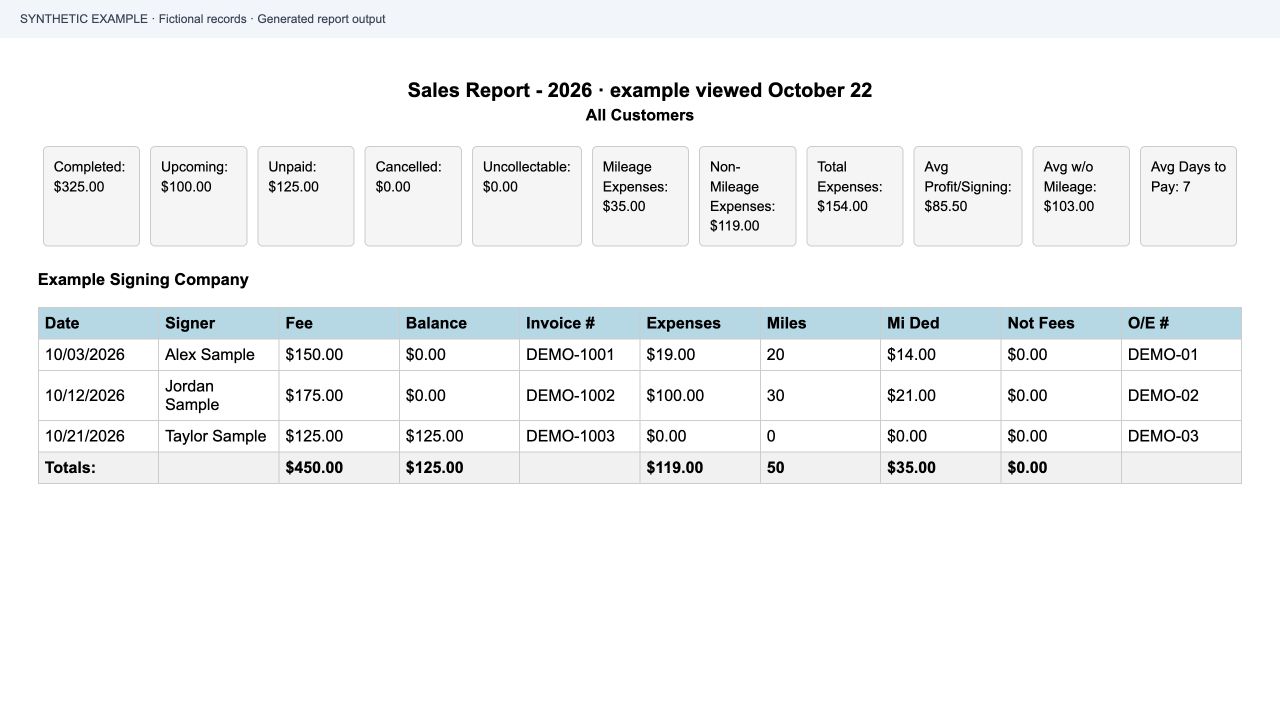
Generated with the app’s Sales Report template and fictional records. This example shows $119 in expense records plus $35 in appointment mileage, for $154 in total expenses.
Expense export
Open full-size screenshot ↗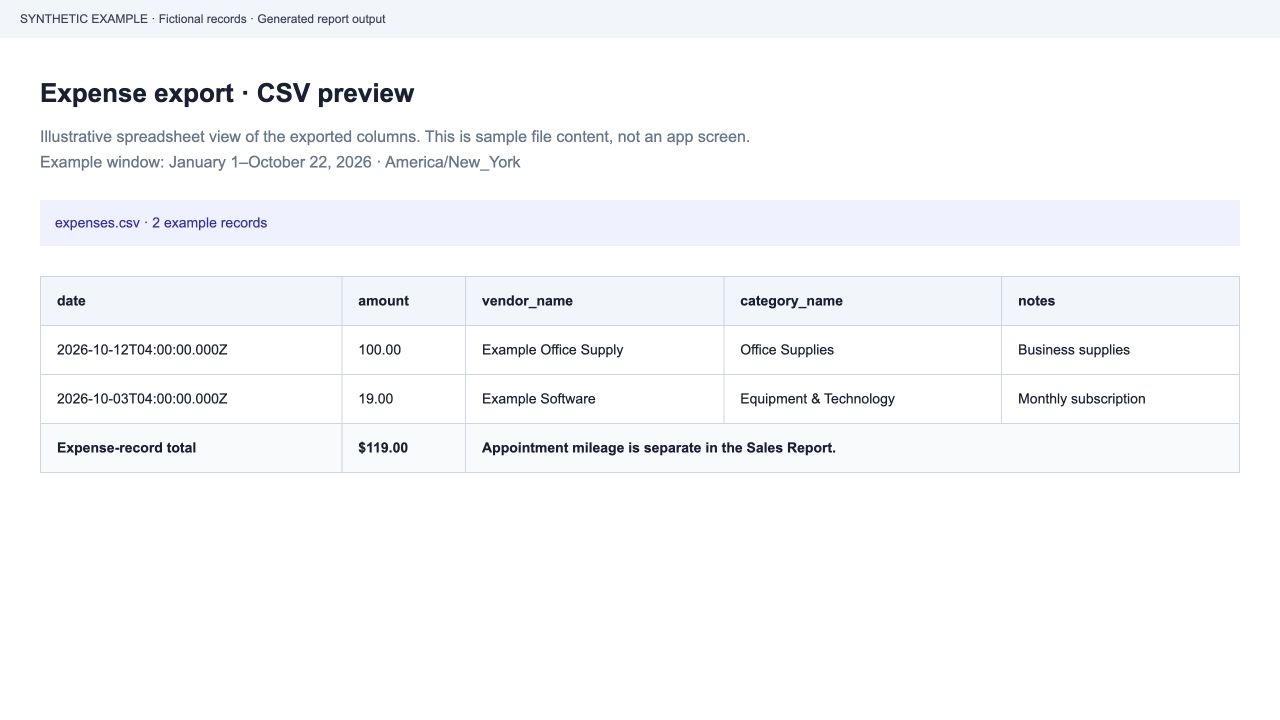
An illustrative spreadsheet view of the exported CSV columns, not an app screenshot. Download the fictional two-record CSV to inspect the $119 expense-record total.
Mileage Report
Open full-size screenshot ↗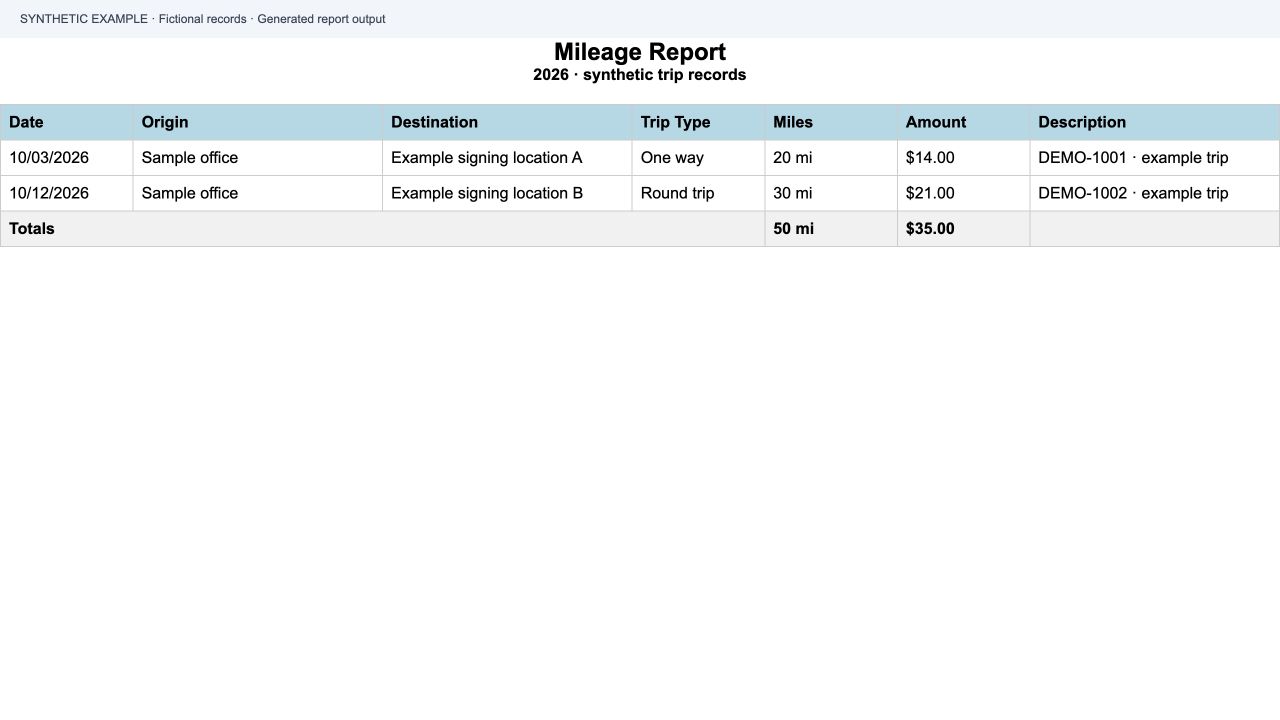
Generated with the app’s Mileage Report template and fictional trips. The example totals 50 miles and $35; the amounts illustrate report fields rather than tax eligibility.
Which dates count toward expenses?
For a year, quarter, or month, the Sales Report expense summary uses the earlier of the selected period end and the end of today in your account’s timezone. Completed periods retain their full date range.
| Period | Expense cutoff |
|---|---|
| Current year, viewed October 22 | October 22, end of the account’s local day |
| Completed previous year | December 31 of that year |
| Period entirely in the future | No expense occurrences |
What affects the result
- The cutoff includes the entire local day, even when the UTC date is different.
- This rule concerns the dated expense summary. Upcoming appointment sales remain in the selected appointment period.
- “All Dates” uses a separate calculation and is outside these cutoff checks.
How do recurring expenses appear?
A recurring expense is a saved schedule. Dated reports expand it into individual occurrences within the applicable expense window, rather than treating the schedule as a single payment.
| Monthly subscription occurrence | Current-year expense summary on October 22 |
|---|---|
| October 3 · $19 | Included |
| November 3 · $19 | Excluded until that date |
| December 3 · $19 | Excluded until that date |
What affects the result
- Examples use a fictional monthly subscription and a fixed October 22 review date.
- The schedule’s start and end dates affect which occurrences appear.
- A scheduled occurrence is not proof that a vendor charged you or a bank payment cleared.
How do Sales Report totals and expense exports relate?
For the tested dated periods, the Sales Report expense records and the CSV export use the same expense cutoff. Matching account, date range, and filters are important when comparing totals.
| Fictional expense records | Amount |
|---|---|
| Other expenses in the selected window | $100.00 |
| October subscription occurrence | $19.00 |
| Expense-record total in both date windows | $119.00 |
| November and December occurrences excluded | $38.00 |
What affects the result
- The comparison checks service calculations with simulated database records; it is not a browser or live-account verification.
- Appointment mileage can increase the Sales Report total beyond the CSV expense records. See the mileage example below.
- A matching total in another accounting product depends on its records, filters, and accounting treatment. No accounting integration is established by these checks.
How is mileage counted?
The Sales Report adds mileage amounts saved on appointments to its expense summary. The expense CSV contains expense records, so the two totals can legitimately differ by appointment mileage.
| Fictional calculation | Amount |
|---|---|
| Other expense records | $20.00 |
| Mileage-category expense record | $5.00 |
| Expense CSV total | $25.00 |
| Mileage saved on the appointment | $10.00 |
| Sales Report total expenses | $35.00 |
What affects the result
- Appointment mileage is selected by the appointment date in the report period.
- Mileage-category expense records also contribute to the mileage subtotal. Review both sources when reconciling.
- These checks demonstrate calculation behavior; they do not determine tax eligibility or verify trip distances.
About these samples
The Sales and Mileage images show generated report output with synthetic records. The expense export image illustrates CSV content in a spreadsheet layout.
Deployment of the expense cutoff update to the live service has not been confirmed.
Documentation details