
Making Sense of a Federated Notary Journal Export
Enterprise title, settlement, and loan closing platforms partner with NotaryCentral to produce legally defensible, state-compliant notary journal records without exposing sensitive signer Personally Identifiable Information (PII) to NotaryCentral itself. Here is how to interpret, verify, and audit every byte of the resulting export.
Zero PII in the Cloud
Signer names, addresses, and ID numbers never touch NotaryCentral cloud servers. The partner retains the raw PII along with a 32-byte cryptographically random salt.
Offline Root Attestation
NotaryCentral issues an RSA-256 JSON Web Signature (JWS) certifying non-PII metadata, document hashes, and the salted PII commitment under a pinned offline trust root.
Local Browser Merging
At audit time, the auditor loads the receipt and PII snapshot into an isolated browser tab. The verifier proves the hash matches and renders state journal entries in browser memory.
Download Authentic Sample Export Artifacts
These authentic sample files were generated and certified during our live end-to-end verifier test runs.
Verified Journal PDF
561 KBComplete 3-page Pennsylvania journal export with cryptographic verification cover, participant PII, credential analysis, and receipt linkage.
Verified Relational CSV
1.3 KBSpreadsheet-safe relational export linking signers to documents with formula injection mitigation (escaped formulas) and credential numbers.
Full Audit ZIP Package
570 KBSelf-contained multi-file package with aggregate CSV, per-record PDF and CSV, and a verification manifest containing SHA-256 digests.
Cryptographic Verification Report
4.6 KBMachine-readable audit record detailing the pass/fail evaluation across all 18 cryptographic invariants and root certificate signatures.
Raw Evidence & PII Bundle
7.1 KBComplete input payload containing the signed receipt, certified key manifest, 32-byte salt, and PII snapshot for independent verification.
Explore the Real Pennsylvania Audit Export
Page 1: Cryptographic Verification Cover
Root-Anchored Attestation & 18 Independent Verification Checks
Every generated journal audit export begins with an immutable, machine-verifiable cover sheet. It proves that the receipt was issued by a certified key from NotaryCentral's pinned offline root and that all 18 cryptographic invariants passed without error.
Key Invariants On This Page
The verifier verifies the key manifest against a hardcoded public key, rejecting any external server certificate overrides.
Universal identifier permanently tying this export to the non-PII attestation receipt stored in NotaryCentral.
Rendered locally in browser memory. NotaryCentral never receives or stores the underlying signer PII.
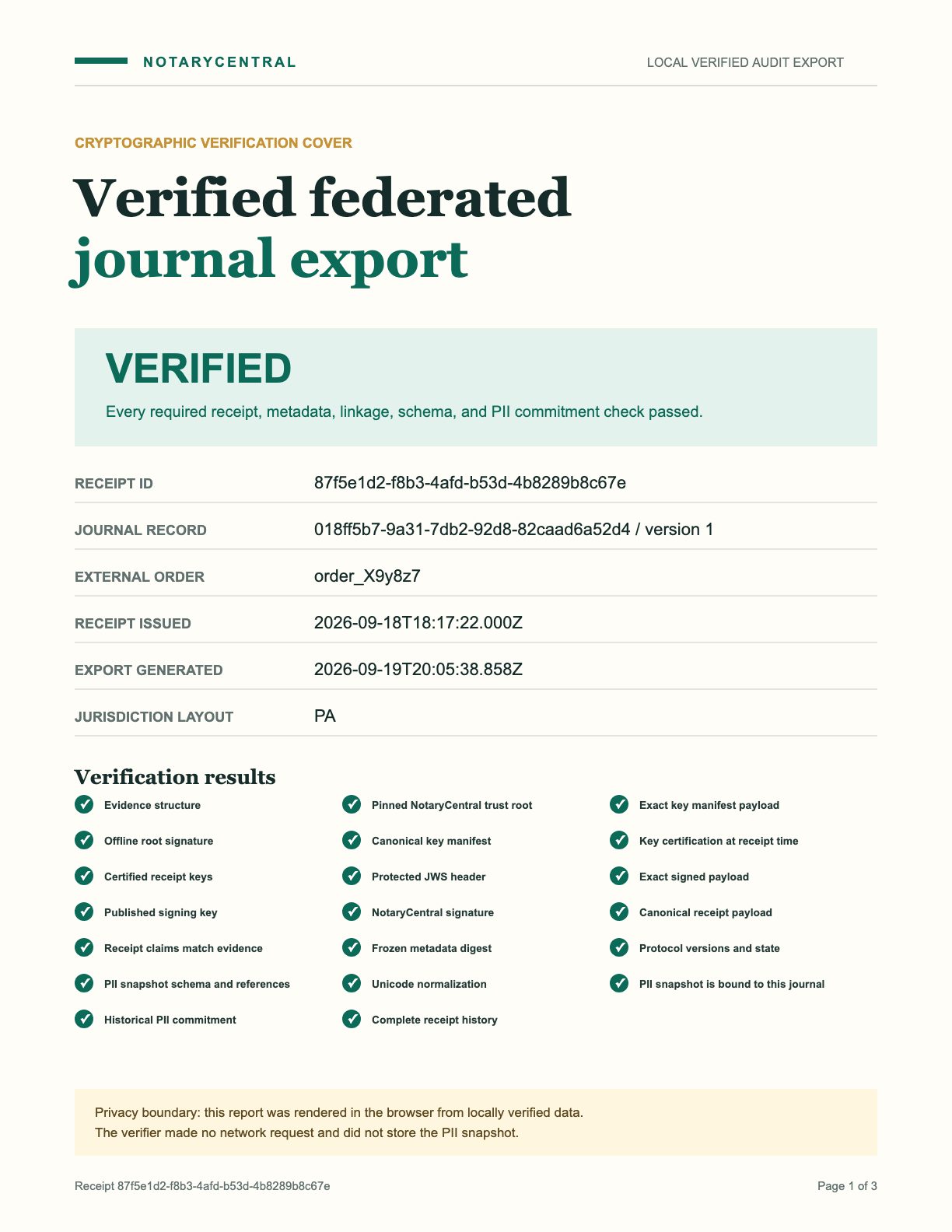
Direct rasterized rendering from the standalone browser verifier (Page 1 of 3).
Anatomy of the Export Files: What Each File Contains
Auditors and regulators receive a package of coordinated artifacts. Each file serves a specific legal and forensic purpose.
1. The Audit PDF (`verified-journal.pdf`)
The PDF is the human-readable compliance document presented to state notary authorities, underwriters, and courts.
- Page 1 (Cover Sheet): Cryptographic attestation cover detailing the offline trust root, receipt ID, notarization timestamp, and full checklist of all 18 cryptographic invariants.
- Page 2 (Jurisdiction Journal Entry): Formatted dynamically to match specific state notary statutes (e.g., Pennsylvania RULONA, Florida RON, Texas, or General). Includes signer names, addresses, ID credentials, and notarial act references.
- Page 3 (Document & Receipt Linkage): Enumerates the signed documents (e.g., Deed of Trust, Note, Mortgage), page counts, signer links, and NotaryCentral’s frozen metadata digest.
2. The Relational CSV (`verified-journal-export.csv`)
Designed for automated ingestion into loan origination systems (LOS), data warehouses, and compliance spreadsheets.
- Formula Injection Mitigation: To prevent CSV formula injection attacks in Excel and Google Sheets, any cell starting with dangerous characters (
=,+,-, or@) is automatically prepended with a single quote ('). - Unicode & Normalization: UTF-8 encoded with strict Unicode NFC normalization to preserve non-ASCII participant names (e.g., accents, umlauts).
- Relational Structure: Denormalizes participant-document relationships so auditors can query which signer executed which specific instrument.
3. The Audit ZIP Package (`verified-journal-audit-package.zip`)
The definitive bulk or single-order forensic archive.
- Folder Hierarchy: Stored under
records/0001-.../journal.pdfandrecords/0001-.../journal.csv. - Verification Manifest: Includes
verification-manifest.jsoncontaining the SHA-256 digest of every file inside the archive, guaranteeing that files cannot be swapped or tampered with post-export.
Understanding the 18 Cryptographic Checks
The standalone verifier executes 18 mandatory checks before unlocking export generation. If even a single check fails, the export gate remains locked.
1. Root Trust & Key Certification
2. Receipt Integrity & Metadata Binding
3. Zero-Network PII Commitment & History
How to Independently Verify on Your Own Machine
You do not need to take NotaryCentral’s word for it. The verification protocol is open source and designed to run entirely offline or in an air-gapped environment.
# 1. Download the evidence bundle and verification tool
curl -O https://www.notarycentral.org/downloads/federated-journal/evidence-bundle.json
# 2. Run the offline zero-network verifier locally
git clone https://github.com/notarycentral/notarycentral-journal-verifier.git
cd notarycentral-journal-verifier && npm install && npm run build && npx serve out
# 3. Paste evidence-bundle.json into the browser tab at http://localhost:3000
# All 18 checks evaluate client-side with zero server calls!