
In modern real estate settlements, title transfers, and institutional loan closings, notaries must maintain legally defensible, state-compliant notary journals without exposing sensitive borrower Personally Identifiable Information (PII) to NotaryCentral itself. NotaryCentral solves this through our federated journal architecture: your enterprise platform retains sole custody of signer PII, while NotaryCentral issues cryptographically signed receipts bound to an opaque order reference.
To govern this security boundary, workspace administrators configure the integration directly inside the NotaryCentral application under Settings → PII Custody Boundary. This guide breaks down every section of the configuration screen, explaining the security rationale and validation rules behind each setting.
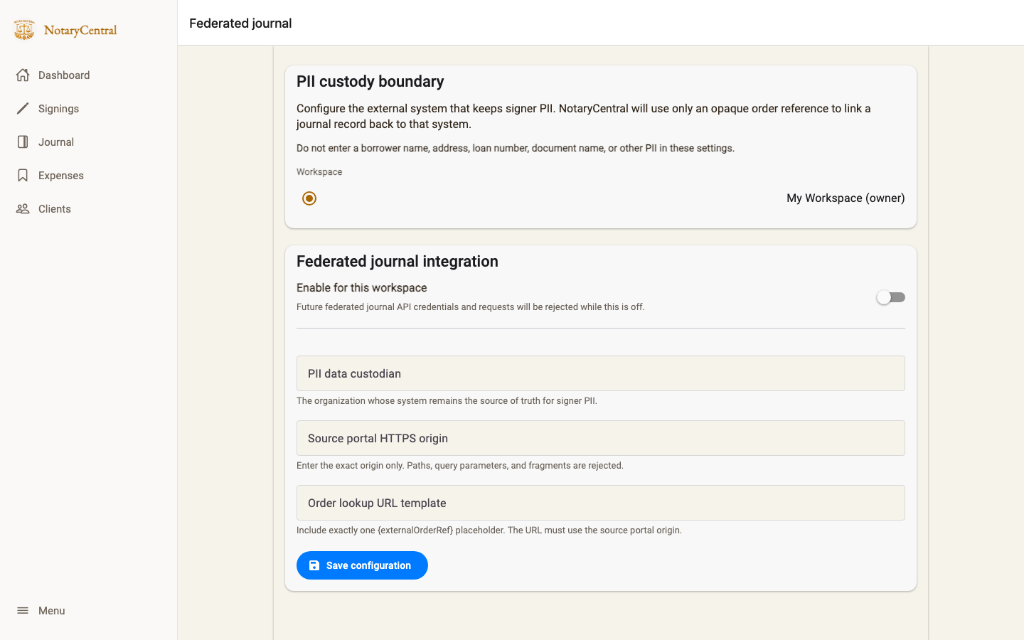
1. The PII Custody Boundary Principle
At the top of the configuration page, NotaryCentral establishes the core security policy:
Configure the external system that keeps signer PII. NotaryCentral will use only an opaque order reference to link a journal record back to that system.
Warning: Do not enter a borrower name, address, loan number, document name, or other PII in these settings.
Why Borrower PII Is Never Exposed to NotaryCentral Itself
In traditional electronic notary software, all borrower data—including government photo ID numbers, home addresses, phone numbers, and Social Security numbers—is transmitted to and stored on third-party vendor servers. This creates severe compliance headaches under GLBA, CPRA, and enterprise vendor-risk frameworks.
In NotaryCentral’s federated journal model:
- Zero Signer PII on NotaryCentral Servers: Sensitive borrower data is never received, processed, or persisted by NotaryCentral cloud systems.
- Custody Remains with the Partner: The external closing or settlement system remains the sole custodian of the raw signer records.
- Cryptographic Blind Commitments: When a signing ceremony completes, the partner platform generates a salted cryptographic hash of the signer data (
NCJ-PII-COMMITMENT\0V2\0+ 32-byte salt + normalized PII snapshot). NotaryCentral cryptographically signs this hash into the permanent tamper-evident receipt without ever seeing or possessing the underlying personal information. - Opaque Identifiers Only: NotaryCentral only ever stores an unguessable identifier, such as
order_X9y8z7.
Keeping the settings page strictly architectural ensures that even your workspace metadata remains entirely free of PII.
2. Workspace Scoping & Administrative Privilege
The first interactive section allows you to select which workspace you are configuring:
Architecture
Multi-Tenant Isolation
Each organization workspace maintains completely separate integration settings, API credentials, and custodian definitions. An enterprise operating multiple divisions can tailor settings per entity.
Security
Role-Based Protection
Modifying the PII custody boundary requires Owner or Admin workspace permissions. Standard members and signing notaries have read-only visibility.
Auditability
Read-Only Transparency
Notaries can review the active custody settings to confirm that their remote signings operate under strict zero-exposure privacy without having the power to accidentally disrupt integration settings.
If a user without administrative permissions accesses this page, the form controls are disabled and an informative banner appears:
This configuration is read-only for your workspace role. An owner or admin can change it.
3. The Master Switch: "Enable for this workspace"
The top toggle in the Federated journal integration card serves as the master kill-switch:
- Enabled (Active): The workspace allows external API clients to authenticate via OAuth, register journal intents, submit cryptographic commitments, and finalize completed notary entries.
- Disabled (Fail-Closed): All incoming API requests, token exchanges, and finalization calls targeting this workspace are immediately rejected with an HTTP 403 status.
The Fail-Closed Guarantee
In security engineering, fail-closed means that in the absence of explicit, verified authorization, the system blocks all access by default. If an organization temporarily halts an external integration, toggling this switch off instantly seals the workspace without altering existing records or deleting past cryptographic receipts.
4. Field-by-Field Breakdown
When the master switch is enabled, administrators must configure three mandatory parameters before saving:
A. PII Data Custodian
- Label:
PII data custodian - Maximum Length: 120 characters
- Description: The legal entity or enterprise organization whose system remains the authoritative source of truth for signer PII (for example, Apex Title & Settlement Services, First National Escrow, or Beacon Lender Services).
- Audit Value: This custodian name is permanently inscribed on the verification cover of generated journal audit reports (
verified-journal.pdf). When an insurance underwriter, court of law, or secretary of state inspects an audit export, the cover sheet clearly indicates which legal entity maintains custody of the unredacted borrower identification records.
B. Source Portal HTTPS Origin
- Label:
Source portal HTTPS origin - Format: Strict HTTPS Origin (e.g.,
https://portal.settlement-partner.example.com) - Validation Rules:
- Must begin with
https://(plainhttp://is strictly prohibited). - Must specify only the protocol, domain, and optional port.
- No paths, query strings, or hash fragments: Entering
https://portal.example.com/ordersorhttps://portal.example.com?tab=1will trigger a validation error.
- Must begin with
- Security Defenses: Enforcing a strict origin prevents open redirect vulnerabilities, cross-site scripting (XSS) vectors, and Server-Side Request Forgery (SSRF). NotaryCentral validates that all outbound deep links point solely to your organization's verified domain.
C. Order Lookup URL Template
- Label:
Order lookup URL template - Format: URL template matching the Source Portal Origin and containing exactly one
{externalOrderRef}parameter. - Example:
https://portal.settlement-partner.example.com/orders/{externalOrderRef} - Validation Rules:
- Must begin with the exact
sourcePortalOriginconfigured above. - Must contain exactly one
{externalOrderRef}token. - Must not contain unescaped spaces or malformed URL syntax.
- Must begin with the exact
- Operational Workflow: When a notary or supervisor reviews a journal entry in NotaryCentral or opens an audit record in the zero-network verifier, the system interpolates the opaque external reference into this template. Clicking the link takes an authorized user directly to the settlement platform's authenticated order dashboard—allowing them to view borrower paperwork without NotaryCentral ever intercepting or storing the order's sensitive loan or identity data.
5. Tamper-Evident Configuration Audit Trail
Directly below the input fields, NotaryCentral displays an immutable change notice:
Last changed September 19, 2026, 4:15 PM by user_admin_99214. Each save is recorded in the configuration audit log.
Every update to the PII custody boundary is logged with:
- The authenticated user ID of the administrator who submitted the change.
- The high-resolution UTC timestamp.
- The previous and new configuration states stored in the relational database.
This tamper-evident audit log ensures that any modification to external portal origins or custody designations can be traced during an IT compliance review or SOC 2 audit.
6. How Settings Connect to Zero-Network Verification
Configuring these settings is the first step in enabling the end-to-end zero-exposure lifecycle:
+-----------------------------------------------------------------------------------+
|                           ENTERPRISE SETTLEMENT SYSTEM                            |
|  - Holds Signer PII (Names, SSNs, IDs, Addresses)                                 |
|  - Computes Salted SHA-256 PII Commitment: H("NCJ-PII-COMMITMENT" + Salt + PII)   |
+-----------------------------------------------------------------------------------+
                                         |
                       Opaque Reference & Commitment Only
                               (Zero Signer PII)
                                         v
+-----------------------------------------------------------------------------------+
|                               NOTARYCENTRAL CLOUD                                 |
|  - Verifies Workspace Custody Settings (Origin & Custodian)                       |
|  - Signs RSA-256 JWS Receipt binding Metadata Digest + PII Hash Commitment       |
|  - Never receives or stores borrower names, IDs, or sensitive documents           |
+-----------------------------------------------------------------------------------+
                                         |
                               Signed Receipt (JWS)
                                         v
+-----------------------------------------------------------------------------------+
|                        OFFLINE ZERO-NETWORK VERIFIER                              |
|  - Merges Partner's PII Snapshot + NotaryCentral JWS Receipt in local browser RAM |
|  - Evaluates all 18 cryptographic invariants locally with NO server communication|
|  - Generates state-compliant PDF, relational CSV, and forensic ZIP packages       |
+-----------------------------------------------------------------------------------+
When an auditor uses the standalone journal verifier, the export package incorporates your configured PII data custodian on the receipt cover, and uses your Order lookup URL template to provide direct traceability back to the loan file.
Explore our comprehensive guide on Making Sense of a Federated Notary Journal Export, where you can download authentic sample PDFs, CSVs, and forensic ZIP archives generated from our automated test suite.
Frequently Asked Questions
- Can NotaryCentral support staff view my signers' personal information?
No. Because NotaryCentral never receives or stores the PII snapshot, it is mathematically impossible for NotaryCentral personnel, database administrators, or cloud infrastructure operators to view or extract signer personal information. The raw data remains exclusively within your enterprise platform.
- What happens if our enterprise system calls the API while the toggle is disabled?
NotaryCentral rejects the request immediately with an HTTP 403 Forbidden error stating that federated journaling is not enabled for the workspace. No draft records are generated, and no receipts are signed.
- Why does the Source Portal Origin reject paths and query parameters?
Restricting the origin to protocol and domain (e.g.,
https://portal.example.com) eliminates open-redirect vulnerabilities and ensures that deep links can only route to your verified corporate origin, protecting notaries and auditors from phishing or spoofed domains.- Why must the URL template contain {externalOrderRef}?
The
{externalOrderRef}token is dynamically replaced with the opaque reference provided during transaction initiation. This enables one-click navigation from the audit interface directly into your internal order management system without requiring NotaryCentral to know any transaction details.