
The Appt reminders settings page controls when reminder notifications are sent before an appointment and which channels are used. You can configure reminders for yourself and for signer participants from the same screen.
Need broader setup context? Start with the Getting Started guide.
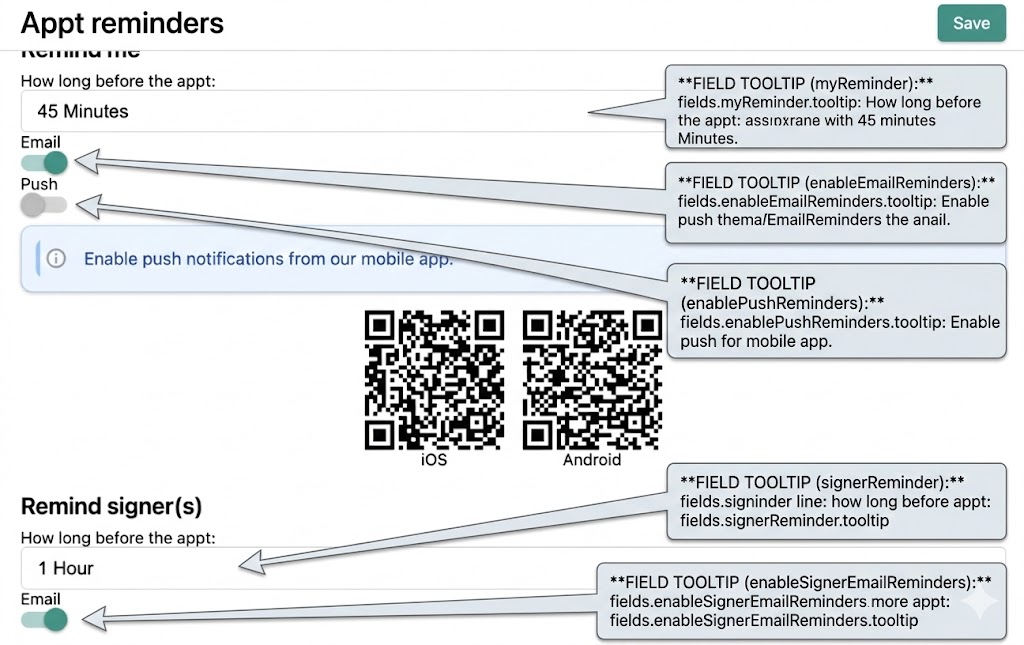
Reminder timing options
For both reminder groups, timing uses the same menu of options:
- None
- 5 Minutes
- 10 Minutes
- 15 Minutes
- 20 Minutes
- 30 Minutes
- 45 Minutes
- 1 Hour
- 2 Hours
- 1 Day
Choosing None turns that reminder sequence off until you select a new lead time.
1) Remind me
Use this section to control your own reminder experience.
- How long before the appt: Choose when your reminder should trigger.
- Email: Turn on to receive reminder emails at the selected lead time.
- Push: Turn on to receive mobile push notifications.
2) My reminder delivery channels
Email and push channels can be used independently.
- If email is enabled, you’ll receive reminders in your inbox.
- If push is enabled, your mobile device receives notification alerts.
- On web, push notifications may require mobile app setup and permission approval.
3) Remind signer(s)
Use this section to control signer reminder emails.
- How long before the appt: Choose how far in advance signer reminders should be sent.
- Email: Turn on to send signer reminder emails at the selected lead time.
This is useful for reducing missed appointments by giving signers a consistent heads-up.

Before you tap “Save”
Run this quick check:
- Confirm your own reminder lead time and channels.
- Confirm signer reminder lead time.
- Verify email/push toggles match your communication policy.
- If using push, verify mobile permissions are granted.
After saving, reminder delivery follows the timing and channel settings you selected.
Need the complete sequence for first-week setup? Return to the User-Friendly Onboarding hub.