
Business Management Suite
Your notary business, from booking to bookkeeping.
Keep appointments, client details, invoices, and expenses connected. Built for independent notaries and signing agents, with workspace options for teams.
- Appointments & clients
- Invoices & expenses
- Reports & mileage
Explore your connected business workflow.
Bring the booking in
Share your booking page and collect the details you need before the appointment.
See bookingPrepare for the appointment
Keep booking answers and appointment details close to the work.
See appointment detailsUnderstand your business numbers
Review expense records, mileage, and report output before exporting.
See reports & expensesFind a feature guide
Explore booking, client communication, reports, setup, and workspace security.
Browse the guidesLet customers take the first step.
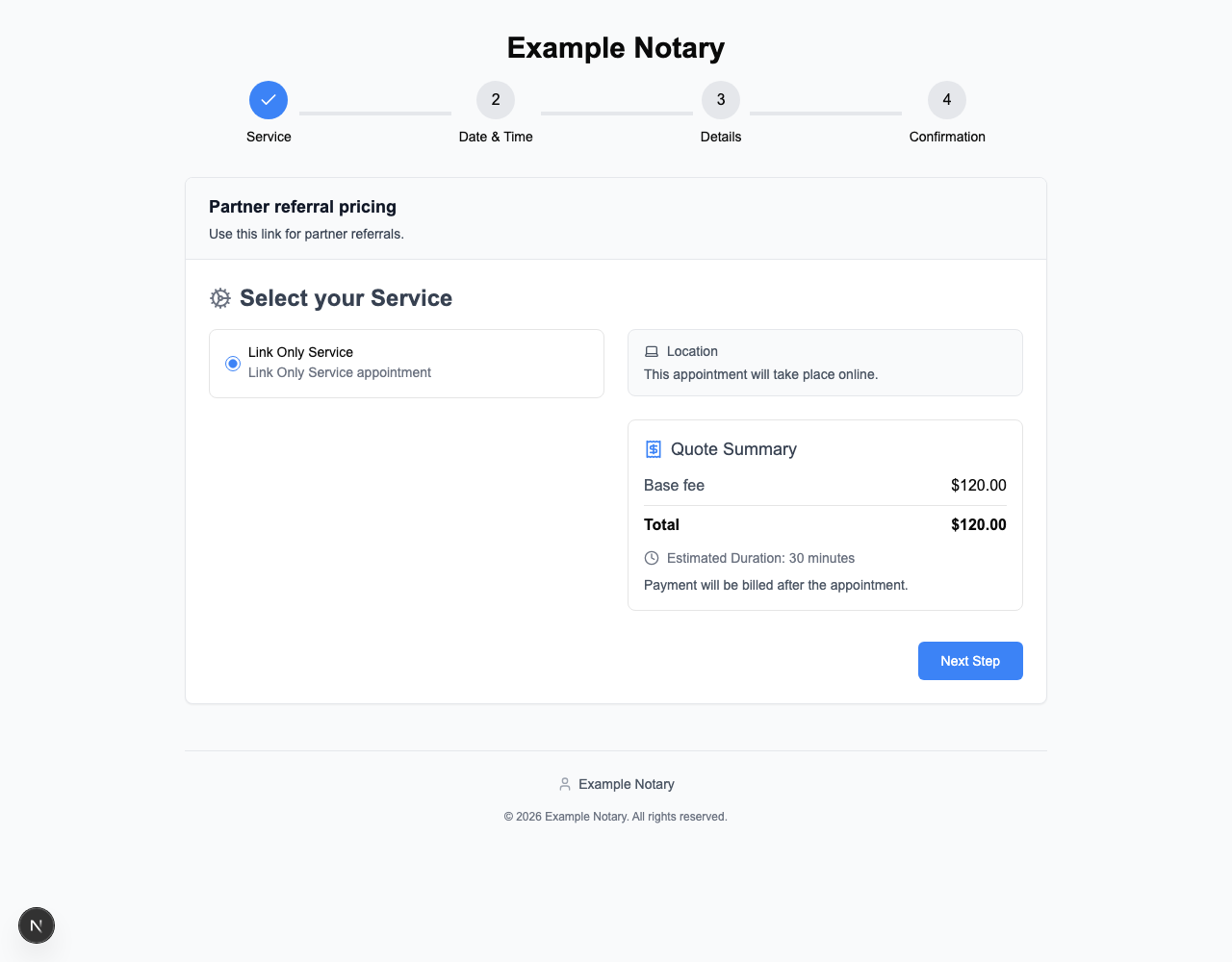
Give customers a booking link, then collect information for the appointment.
- 1
Share a booking page
Offer a customer-facing place to select a service and continue to scheduling.
- 2
Ask the questions that matter
Add booking questions for the document types and details you need to prepare.
- 3
Support the work you take
Use booking workflows for loan signings, general notary work, and other appointment types.
 Open full-size image ↗
Arrive with the details in hand.
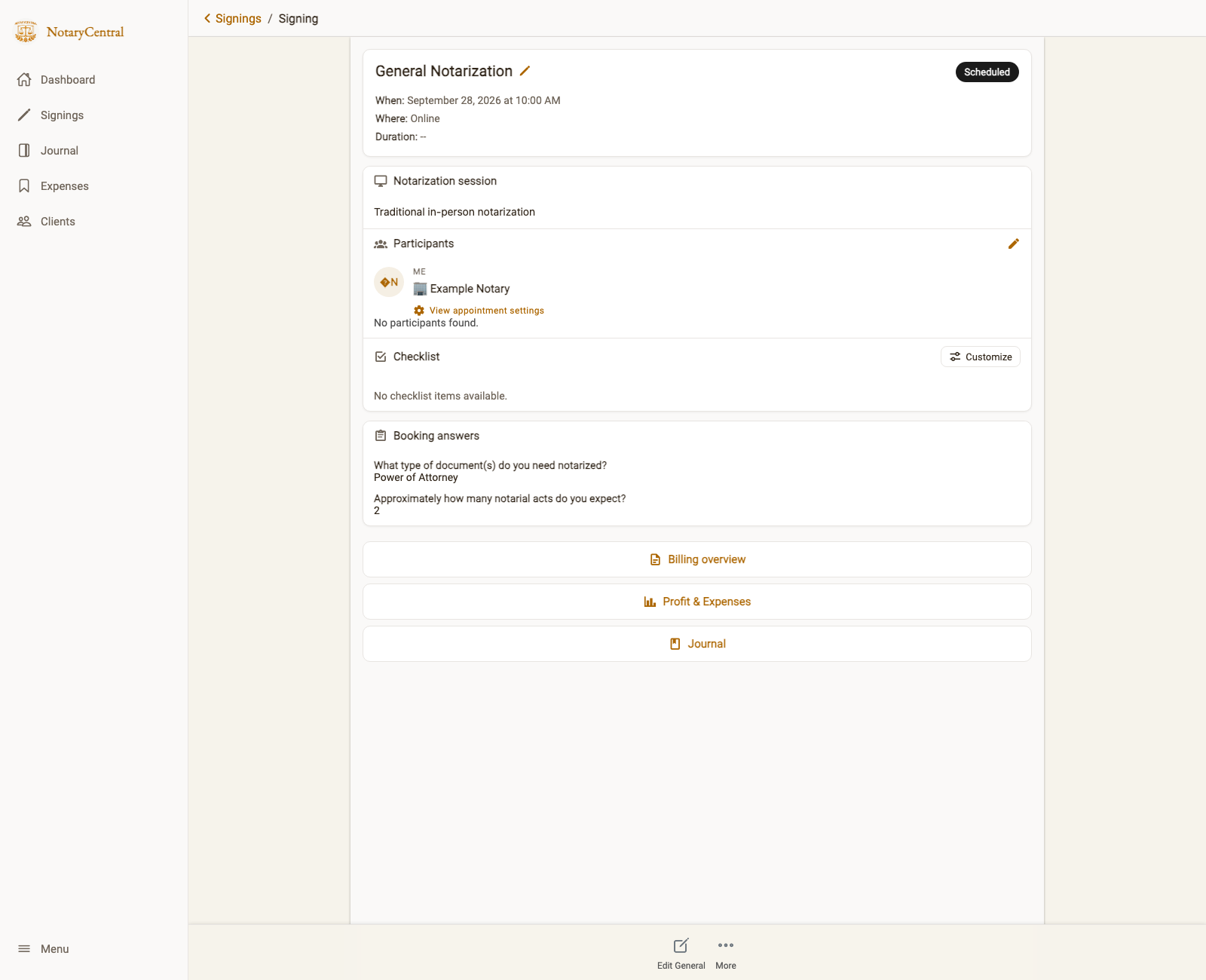
Move from a booking request to an appointment you can prepare for.
- 1
Review saved answers
Read the customer’s booking answers on the appointment record.
- 2
Keep client and billing work connected
Manage client information, prepare invoices, and review balances as part of your business workflow.
- 3
Keep communications consistent
Use reusable email templates for appointment confirmations and related messages.
 Open full-size image ↗
See the records behind the totals.
Track business expenses and mileage, then review what your reports and exports contain.
- 1
Keep expenses organized
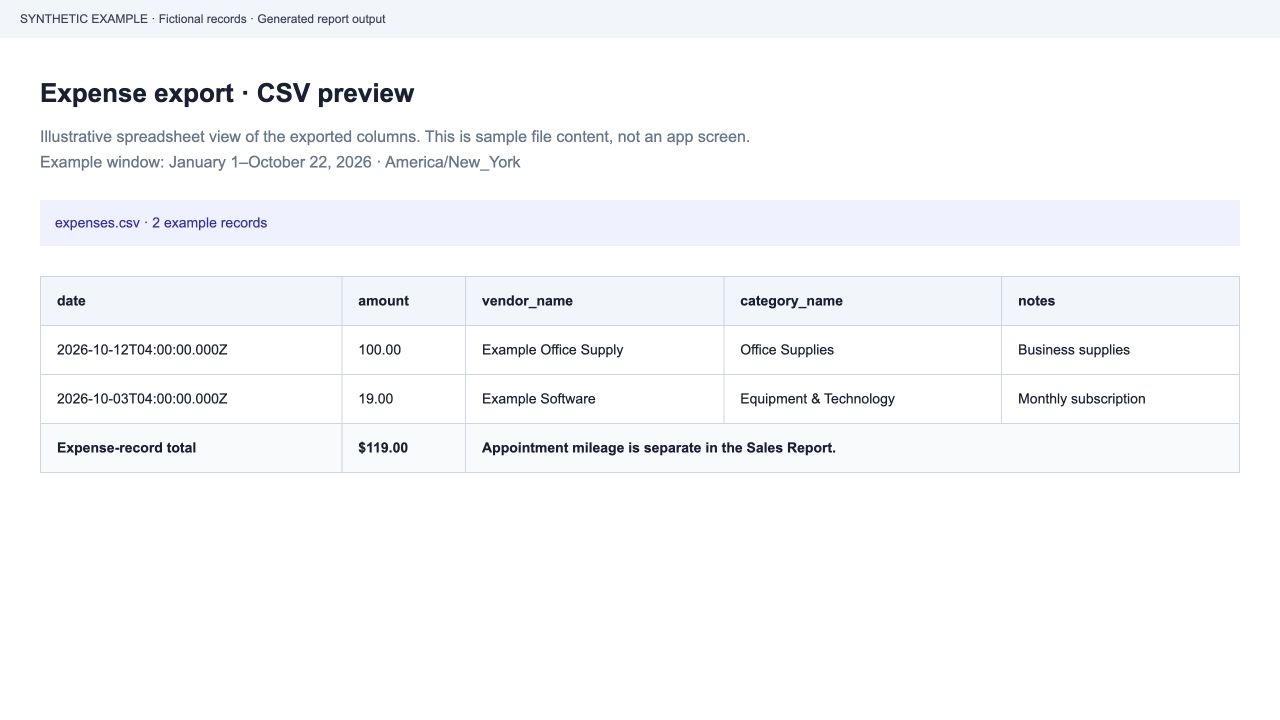
Record amounts, vendors, categories, and purposes for business expenses.
- 2
Inspect the report output
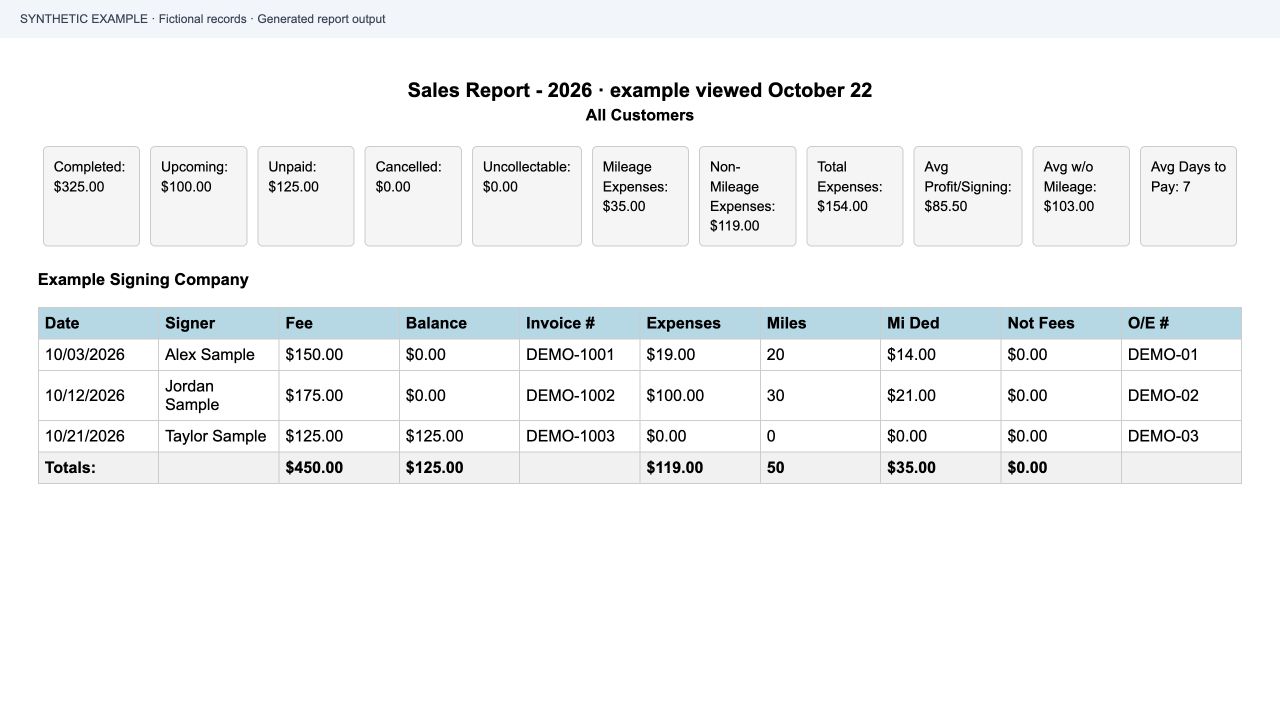
Review Sales and Mileage report examples and the fields in an expense export.
- 3
Compare like with like
Use the same date range and filters when reconciling records. Appointment mileage can appear separately from exported expense records.
 Open full-size image ↗
Keep the rest of your work connected.
Bring in orders from other platforms
Connect supported signing-order workflows so appointment information stays accessible.
Explore order connectionsCoordinate team appointments
Workspace Business Suite coverage lets admins review shared appointments. Enable Notary assignment to route work to eligible team notaries.
Explore team operationsFind guidance when you need it
Use Ask AI to explore state-specific notary questions alongside your business tools.
Explore Ask AIBring in bookings and prepare for appointments
Offer the right services, agree on terms, and manage appointment outcomes.
Partner booking links
Offer selected services with separate prices, travel charges, and payment timing.
Read the guideBooking policies and accepted terms
Keep the wording and timing boundaries each customer accepted.
Read the guideAppointment milestones and policy fees
Record departure, arrival, and final outcomes using accepted appointment rules.
Read the guideBooking on your own website
Enable your website to display the customer booking portal.
Read the guideKeep clients informed and understand your income
Follow up with customers and review the records behind your business numbers.
Automated Google review requests
Choose recipients and request reviews after successfully completed appointments.
Read the guideParticipant reminders and notifications
Configure participant reminders, personal notifications, and mobile alerts.
Read the guideClient directory and appointment history
Find clients and review their contact details, appointments, and document links.
Read the guideReports for tax preparation and reconciliation
Explore Profit & Loss, expense, mileage, payments received, and unpaid-invoice reports.
Read the guideGet set up and protect team access
Configure the workflows you need and verify who can access shared work.
Guided Workspace Setup
Build a configuration plan from your website, profile links, or business notes.
Read the guideContinue Business Suite setup
Understand how saved choices and existing settings shape your remaining checklist.
Read the guideRequire MFA for your workspace
Prepare your account and require second-factor verification for shared workspace access.
Read the guideA few things to know before you start.
Is Business Suite for independent notaries or teams?
It supports independent business workflows, with workspace options for teams. Shared appointment access and assignment depend on workspace Business Suite coverage and configuration.
Can I see the reports before signing up?
Yes. The sample Sales Report, Mileage Report, and expense CSV use fictional records. Open the report examples in the reports and expenses section to inspect the layouts.
Does an expense export always equal the Sales Report total?
Compare matching accounts, date ranges, and filters. The Sales Report can include appointment mileage in addition to expense records. The reporting guide explains the distinction.
Can I export my expense records?
Expense records can be exported as a CSV with dates, amounts, vendors, categories, and notes. The reporting guide includes a fictional sample file you can download and inspect.
Where can I check pricing and what is included?
The Business Suite pricing page lists current plan options and links to workspace information. Review those details before choosing access.
Take a closer look.
Overview deck
A shareable introduction to scheduling, bookkeeping, and client-management tools.
Open overview PDFDetailed product requirements
Review the behavior and supporting detail behind Business Suite workflows.
Explore requirementsCurrent plans and pricing
Review Business Suite access options and workspace information in one place.
See Business Suite pricingBooking and appointment guides
Explore partner links, booking policies, appointment outcomes, and website embedding.
Browse booking guidesClient communication and reporting guides
Explore review requests, reminders, client history, and financial reports.
Browse client and reporting guidesSetup and workspace security guides
Build a setup plan, continue your checklist, and configure workspace MFA.
Browse setup guidesBring your next booking and business record together.
Start with Business Suite, then set up the workflows you use every day.